
1. How does CounselMore handle "stealth" essays that only appear once you're inside a school's own portal?
Good example, and worth clarifying the vocabulary here because it changes how you handle it.
CounselMore coined the terms "trigger essay" and "stealth essay" back in 2016, and both are covered in your College Readiness Curriculum (Assignment 5A/5B, Supplemental Essays: Trigger & Stealth Awareness). They describe two related but distinct problems:
-
Trigger essay: An essay that appears because of an action the student takes inside Common App — checking a scholarship interest box, selecting a major, indicating honors college interest. It's triggered by student behavior.
-
Stealth essay: An essay that isn't listed on Common App at all — it only surfaces once a student logs into that school's own applicant portal after submitting. It's hidden until you go looking for it, the way the Santa Clara example works: no Common App listing, but an optional essay waiting inside the portal.
Both are "surprise" essays. The difference is where they're hiding.
How to collect and track these:
- When a student or you discovers a stealth or trigger essay, add it to the school's essay document in Google Drive with a header noting which type it is and the date it appeared.
- Generate an assignment in App Tracker for that school so the student drafts it from existing B-roll material rather than starting cold.
- Add the discovery to that school's Counselor Opinions column in College List. This is the step that turns a one-off discovery into something the whole CounselMore community benefits from.
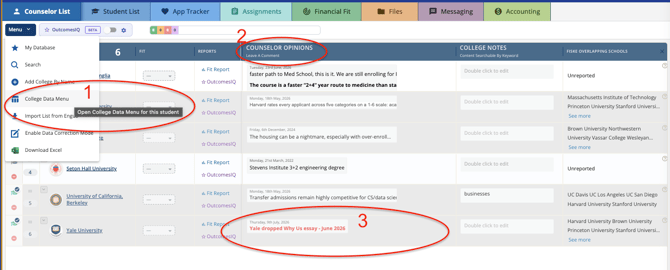
Using the Counselor Opinions column — the workflow shown in the screenshot (right):
- From College Data Menu, open the school's record.
- Post your note in Counselor Opinions — dated, specific, and short (see the Yale example: "Yale dropped Why Us essay – June 2026").
- Once posted, use Broadcast Station (Messaging → Broadcast) to filter for every student on your roster applying to that school and send a quick alert. This is the fastest way to get a mid-cycle change in front of every affected family at once, rather than checking each App Tracker row individually.
A community norm worth repeating to your group: the Professional Forum under Help is for asking questions. If a school-specific, time-sensitive detail gets shared there in the course of a conversation — a dropped essay, a changed deadline — copy that detail over to the Counselor Opinions column for that school so it's captured where the rest of the community will actually find it later. CounselMore isn't going to pre-decide what belongs in the Forum versus the Opinions column; that judgment call sits with the counselor who has the information. If you want the technology to do more of that sorting automatically, that's exactly the kind of feedback the AI Assistant team wants to hear.
2. Should CounselMore add a data field for a college's AI usage policy — maybe near the essay prompt column?
Not yet, and here's the reasoning so you can pass it along if it comes up again.
CounselMore doesn't take on responsibility for a new data field the moment someone identifies it as a good idea. We wait until user behavior — not just verbal requests — shows it's warranted. Counselors often say a new field would be useful in the abstract, but that doesn't always translate into consistent use once it exists.
Right now, the number of colleges publishing a formal AI usage policy for applicants is still small — comparable to how few schools were using the SAR/STAR-style reporting formats in their early days. A handful of schools moving on something isn't the same as an ecosystem-wide need. We balance the request against actual behavior before committing engineering time to a new column, so that the fields we do add are ones counselors will actually rely on rather than ones that sit empty.
3. Can we get a filter for UK schools, Canadian schools, or English-speaking international schools generally?
You already have this. In College List, click Filters → Location — you can filter by country and region today, including international options.
Longer term, this kind of search is also where the AI Assistant (accessible from the Help button) is headed. Right now it's built to answer questions about CounselMore's features and functionality. Over time it will grow to help with tasks like this — searching for schools by criteria and surfacing recommendations — but that capability isn't live yet. If you're using the AI Assistant today, keep sending feedback on it; that usage is exactly what will shape what it does next.
4. member can't log into her demo student account to see what students actually see — can someone attend Study Hall and walk us all through?
Yes — a Tech Mentor will be at the next Study Hall specifically to work through this with Louise and gather any related feedback on the mobile app from the group. In the meantime, the feature she's after is "Log in as Student," available from inside any student record — it's the fastest way to preview the portal exactly as a student sees it before granting real access.
5. The résumé/activities export only shows the SAT Math score, not Reading/Writing.
Thank you for flagging this — noted. The Tech Mentor will gather the full detail on this at the next Study Hall meeting so it gets routed to the right place. No timeline to share yet; we'll follow up once there's something concrete to report.
Have a question that didn't make this list? Bring it to Friday Study Hall or drop it in the Professional Forum under Help, and it'll find its way into the next round of answers.