---
title: Reporting - Potential & Post Applications, Tracking Application Outcomes
description: "Reporting - Accepted / Declined Admissions Reporting Student Profile - Application Results\nArchiving records - record outcomes first"
---
[Skip to content](https://helpdesk.counselmore.com/reports-accepted-/-declined-admissions-reporting#main-content)
English
Show submenu for translations
[](https://helpdesk.counselmore.com/?hsLang=en)
Open main navigation
Close main navigation
- English
Show submenu for translations
Select below, or search by topic
- There are no suggestions because the search field is empty.
1. [Knowledge Base : CounselMore Support](https://helpdesk.counselmore.com/?hsLang=en)
2. [ADMISSIONS DATA & SEARCH NAVIGATION](https://helpdesk.counselmore.com/admissions-data-search-navigation?hsLang=en)
3. [College Data - App Tracker](https://helpdesk.counselmore.com/admissions-data-search-navigation?hsLang=en#college-data-app-tracker)
# Reporting - Potential & Post Applications, Tracking Application Outcomes
## Reporting - Admissions Outcome - Application Results Archiving records - record outcomes first - Initial and Final Decision
#### **Video in an example:** A customer asks a question \> they receive an answer from a peer in a video. No place else is like CounselMore. **Peer Mentor Sessions Happen every day! Join us! For Counselor Centric Support!**
---
#### Admissions Outcomes: Accepted / Declined After each application season, the bulk of our students will start to receive their admission results. It's important for us as counselors to track these numbers so we can reflect and make changes accordingly for next season.
Schools will be added to the 3 phase college list builder.
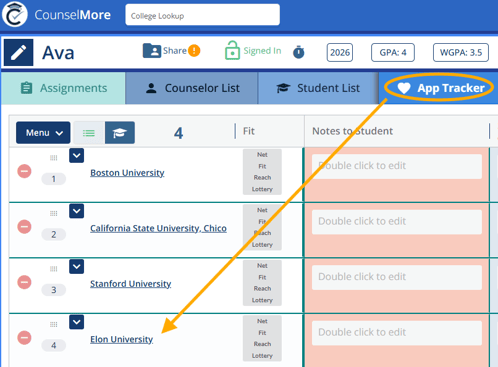
Schools are promoted from the counselor list to the Student list and to the App tracker. We track the application via the App Tracker tab. At the end of the process, record the outcomes in the blue cells to the far right in your app tracker.
👉 💡 Tip:
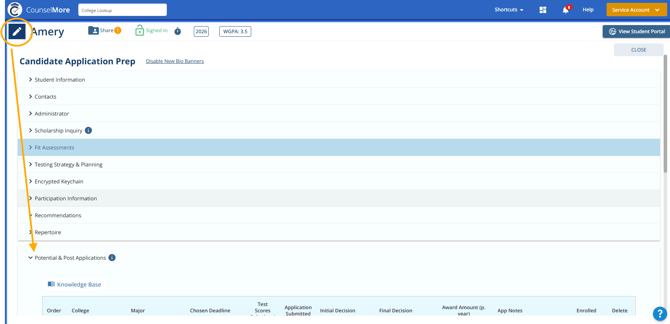
Student Profile also have a Potential & Post Applications banner. This works with the App Tracker. Schools on the App tracker will appear here in this banner. If the school is not on the App tracker - it will not appear in the Banner.
Archiving student records:
Prior to archiving a student record a small window will launch asking that you input your outcome for each application School. Sometimes students forget to report back their application outcomes. CounselMore will remind the counselor as of June 1st of their graduating class year to update the application outcome for each student prior to completing archive. Read here: [Archiving Student - Record App Outcomes](https://helpdesk.counselmore.com/archiving-student-record-app-outcomes?hsLang=en)
### **I'd like to track the Major my student applied to on each application...how can I best track that information?**
Please watch this loom demonstration of capturing what major your student applies to at each school. [VIDEO HERE](https://www.loom.com/share/1fb97c7098a144d49e7b7a46c867ed20)
### See below for more information
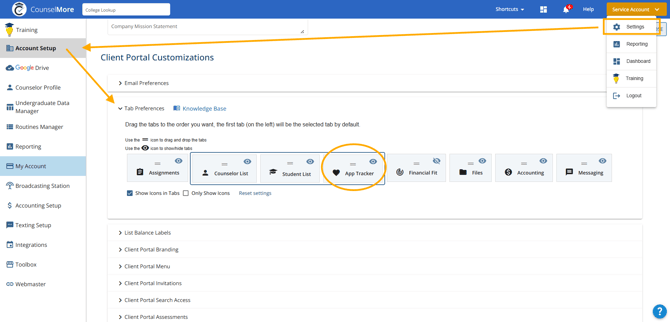
#### Any schools that you want to track need to be in the App Tracker. Make sure that your App Tracker is visible by managing your business setup.
Head to Settings \> Account Setup \> Scroll down and select Tab Preferences \> Click the icon to show/hide App Tracker tab
### **There are two ways that you can track the Potential & Post Applications information:**
1\. Click the pencil icon at the top left to access your [Student Profile](https://helpdesk.counselmore.com/biography-banners-basics?hsLang=en) and select the Potential & Post Applications banner to expand it.
- Selecting "Add College" will include the college in all three lists: Counselor List, Student List, and App Tracker.
- From here you can set status and add major, chosen deadline, test scores submitted, application submitted, initial decision, final decision, award amount, app notes, enrolled.
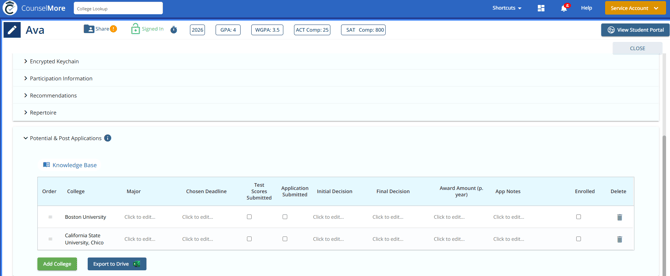
Keep in mind that schools are tracked per student record so be sure to do the following for **every student record**
- You can also set status, major, chosen deadline, awards/notes, and whether or not they enrolled at the right of the App Tracker tab.
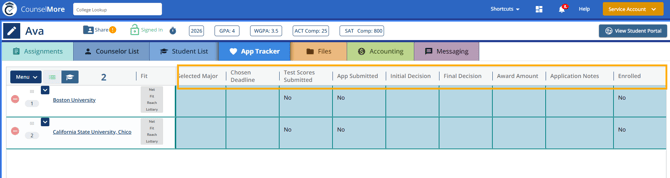
- Click on the blue part of what you want to edit.
This should pop up:
### 
- - Now you can click on whichever application result you want and click the square at the top right to apply it. The same goes for the other blue tabs.
There are 2 outcome columns (**Initial and Final Decision**) regarding decisions. This is because so many schools are using deferral as a part of their process.
You may choose to only record outcomes in the **final decision column** where Accepted / Denied is available.
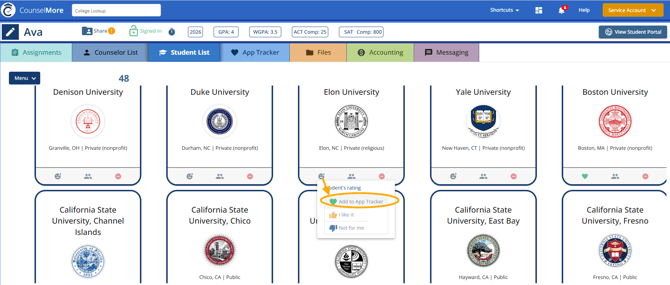
2\. Counselor will promote college to the student list. When the student **click the heart icon** it will automatically send the school to the app tracker AND it will appear on the Student Profile.
App Tracker:
You can see results in **[Reporting](https://helpdesk.counselmore.com/reporting?hsLang=en)** or your Dashboard.
- [ACCOUNT SET UP](https://helpdesk.counselmore.com/account-set-up?hsLang=en#main-content)
- [New Account - SELF GUIDED SET UP](https://helpdesk.counselmore.com/account-set-up?hsLang=en#new-account-self-guided-set-up)
- [New Account - FREE LIVE TRAINING](https://helpdesk.counselmore.com/account-set-up?hsLang=en#new-account-free-live-training)
- [New Account - MULTI LICENSE ACCOUNT SET UP](https://helpdesk.counselmore.com/account-set-up?hsLang=en#new-account-multi-license-account-set-up)
- [New Account - COLLEGE SEARCH NAVIGATION](https://helpdesk.counselmore.com/account-set-up?hsLang=en#new-account-college-search-navigation)
- [New Account - PARENT & STUDENT USERS](https://helpdesk.counselmore.com/account-set-up?hsLang=en#new-account-parent-student-users)
- [CLIENT MANAGEMENT](https://helpdesk.counselmore.com/client-management?hsLang=en#main-content)
- [Clients - Biographical Banners](https://helpdesk.counselmore.com/client-management?hsLang=en#clients-biographical-banners)
- [Clients - Assignments tab](https://helpdesk.counselmore.com/client-management?hsLang=en#clients-assignments-tab)
- [Clients - Files tab](https://helpdesk.counselmore.com/client-management?hsLang=en#clients-files-tab)
- [Clients - Messages tab](https://helpdesk.counselmore.com/client-management?hsLang=en#clients-messages-tab)
- [Clients - Accounting tab](https://helpdesk.counselmore.com/client-management?hsLang=en#clients-accounting-tab)
- [Clients - Quicklist](https://helpdesk.counselmore.com/client-management?hsLang=en#clients-quicklist)
- [Clients - Contacts](https://helpdesk.counselmore.com/client-management?hsLang=en#clients-contacts)
- [Clients - Fin Fit tab](https://helpdesk.counselmore.com/client-management?hsLang=en#clients-fin-fit-tab)
- [ADMISSIONS DATA & SEARCH NAVIGATION](https://helpdesk.counselmore.com/admissions-data-search-navigation?hsLang=en#main-content)
- [College Data](https://helpdesk.counselmore.com/admissions-data-search-navigation?hsLang=en#college-data)
- [College List - Columns](https://helpdesk.counselmore.com/admissions-data-search-navigation?hsLang=en#college-list-columns)
- [College Data - App Tracker](https://helpdesk.counselmore.com/admissions-data-search-navigation?hsLang=en#college-data-app-tracker)
- [GOOGLE-DRIVE](https://helpdesk.counselmore.com/google-drive?hsLang=en#main-content)
- [Google Drive Settings](https://helpdesk.counselmore.com/google-drive?hsLang=en#google-drive-settings)
- [Google Drive - Master Folders](https://helpdesk.counselmore.com/google-drive?hsLang=en#google-drive-master-folders)
- [Google Drive - Document Management](https://helpdesk.counselmore.com/google-drive?hsLang=en#google-drive-document-management)
- [SETTINGS MENU & CUSTOMIZATIONS](https://helpdesk.counselmore.com/settings-menu-customizations?hsLang=en#main-content)
- [Settings - My Business](https://helpdesk.counselmore.com/settings-menu-customizations?hsLang=en#settings-my-business)
- [Settings - Branding](https://helpdesk.counselmore.com/settings-menu-customizations?hsLang=en#settings-branding)
- [Settings - Default Data Columns](https://helpdesk.counselmore.com/settings-menu-customizations?hsLang=en#settings-default-data-columns)
- [Settings - Routine Assignments](https://helpdesk.counselmore.com/settings-menu-customizations?hsLang=en#settings-routine-assignments)
- [Settings - Webmaster](https://helpdesk.counselmore.com/settings-menu-customizations?hsLang=en#settings-webmaster)
- [Settings - Broadcast Station](https://helpdesk.counselmore.com/settings-menu-customizations?hsLang=en#settings-broadcast-station)
- [Settings - Reporting](https://helpdesk.counselmore.com/settings-menu-customizations?hsLang=en#settings-reporting)
- [Settings - Professional Log Books](https://helpdesk.counselmore.com/settings-menu-customizations?hsLang=en#settings-professional-log-books)
- [Settings - Toolbox](https://helpdesk.counselmore.com/settings-menu-customizations?hsLang=en#settings-toolbox)
- [Settings - Texting Set up](https://helpdesk.counselmore.com/settings-menu-customizations?hsLang=en#settings-texting-set-up)
- [Settings - Accounting Setup](https://helpdesk.counselmore.com/settings-menu-customizations?hsLang=en#settings-accounting-setup)
- [Settings - Integrations](https://helpdesk.counselmore.com/settings-menu-customizations?hsLang=en#settings-integrations)
- [SALES & DEMONSTRATIONS](https://helpdesk.counselmore.com/sales-demonstrations?hsLang=en#main-content)
- [Sales, Free Trials, Demonstrations](https://helpdesk.counselmore.com/sales-demonstrations?hsLang=en#sales-free-trials-demonstrations)
- [MEMBER BENEFITS](https://helpdesk.counselmore.com/member-benefits?hsLang=en#main-content)
- [Community Resources](https://helpdesk.counselmore.com/member-benefits?hsLang=en#community-resources)
- [Member Benefits](https://helpdesk.counselmore.com/member-benefits?hsLang=en#member-benefits)
- [Customer Service Support](https://helpdesk.counselmore.com/member-benefits?hsLang=en#customer-service-support)
- [Privacy Policies](https://helpdesk.counselmore.com/member-benefits?hsLang=en#privacy-policies)
- [Sales Lead Tools](https://helpdesk.counselmore.com/sales-lead-tools?hsLang=en#main-content)
- [Directory](https://helpdesk.counselmore.com/sales-lead-tools?hsLang=en#directory)
[](http://counselmore.com)
Please note that CounselMore is a robust college planning platform with multiple integrations.
Copyright © 2025, CounselMore