
Who Can Create Assignments
The following account types can create assignments:
- Admin accounts
- Superuser accounts
- Counselor accounts
How to Create an Assignment for Another Counselor
- Go to the Assignments tab
- Click the Menu button
- Select Add New Assignment
- Fill in the assignment details
⚠️ Important: Identify the Counselor in the Title
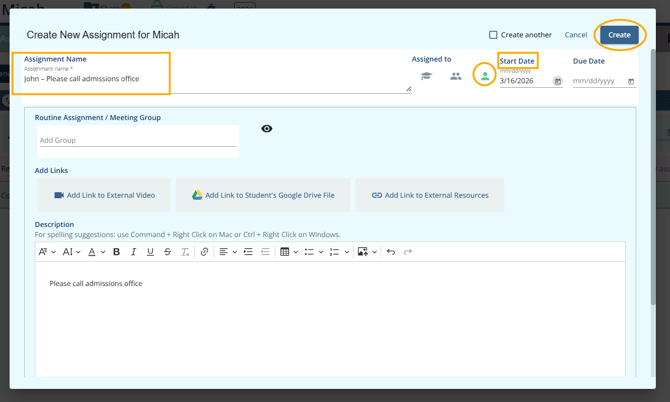
To direct the assignment to a specific counselor, include their name in the Title field.
Example:John – Please call admissions office
This ensures the assignment is clearly intended for that counselor.
Assign the Assignment Type
- Click the single head (counselor) icon
- Confirm the selection
- Set a Start Date to control when the assignment becomes visible
How Assignments Work
- Assignments are linked to the student record, not directly assigned to a specific counselor user
- Any counselor who has access to the student can view and complete the assignment
How the Assigned Counselor Finds the Task
When a counselor logs in:
- They land on the Dashboard
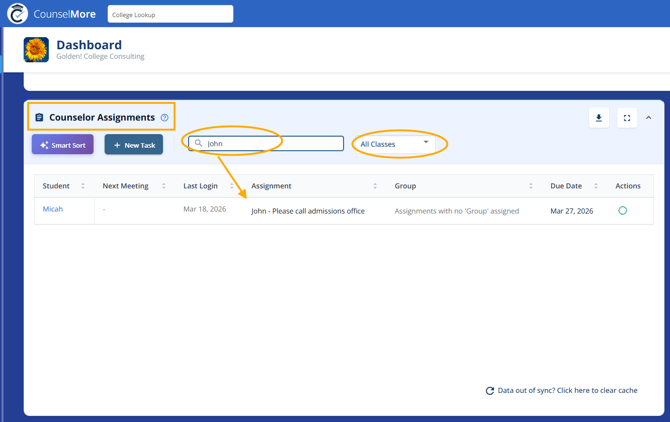
- Locate the Counselor Assignments section
To find assignments intended for them:
- Select All Class Years from the dropdown
- Use the search bar to enter their name (e.g., “John”)
Assignments with their name in the title will appear in the Counselor Assignments tile.
Important Notes
- The system does not automatically assign tasks to a specific counselor user
- To ensure clarity, always include the counselor’s name in the assignment title
- If no name is specified, the assignment is considered the responsibility of the student’s assigned counselor
Superuser & Admin Visibility
- Superusers and Admins can view all counselor assignments
- They can search or filter by counselor name to identify responsibility
- If no specific counselor is indicated, any counselor with access to the student may complete the task