---
title: Google Drive - Basics
description: Google Drive - Basics
---
[Skip to content](https://helpdesk.counselmore.com/google-drive-basics#main-content)
English
Show submenu for translations
[](https://helpdesk.counselmore.com/?hsLang=en)
Open main navigation
Close main navigation
- English
Show submenu for translations
Select below, or search by topic
- There are no suggestions because the search field is empty.
1. [Knowledge Base : CounselMore Support](https://helpdesk.counselmore.com/?hsLang=en)
2. [GOOGLE-DRIVE](https://helpdesk.counselmore.com/google-drive?hsLang=en)
3. [Google Drive Settings](https://helpdesk.counselmore.com/google-drive?hsLang=en#google-drive-settings)
# Google Drive - Basics
## Google Drive - Basics
Watch first video to get an overview and go through remaining content to solidify understanding of basics
What is Google Drive?
Whenever you hear the word Google, you probably think of searching the internet. Google in fact has many products, often referred to as, Productivity Tools. Google Drive & Gmail are just a couple of the many Productivity Tools offered by Google and in order to use them, you need to create a **Google Account**.
**You already have a Google Account you can use iff:**
- Your business email address is setup through Google.
- You have a @gmail address or Google Calendar dedicated for your business
**If you need to create a Google Account please click [here](https://support.google.com/accounts/answer/27441?hl=en).**
**Note**: *when you are going through the account creation process, you may choose to create a Google Account using an existing email address from another provider.*
*We know we all aren't Google experts (who could be?).*
*Google Drive is a true productivity enhancement when directly connected to your CounselMore and Student Portals. What's more, is it is endless.*
*We strive to support our colleagues. We go beyond CounselMore app training. We provide ways to expand your skill set in a safe environment with colleagues who are in the same boat, having fun, paddling along together.*
**Checkout this overview video to learn about Google Drive and some of its features**
### **Fill In The Gaps With Supplemental Content**
```
Tip: A quick way to access your Google Drive is to open a new Google Chrome Window and look at the top right corner, and you will l see an icon with six stacked dots; some like to say it looks like a waffle.
```

Once you click on the waffle, you will see icons for each Google Productivity Tool.
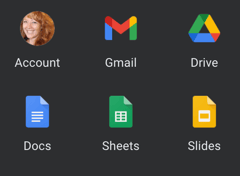
#### Choose Drive.
This will take you to what is referred to as the root of your Google Drive
### **File Types**
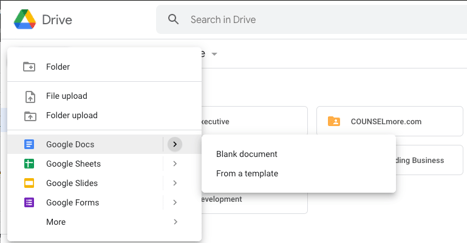
When at the **root** of your Google Drive, click the large "New" button.
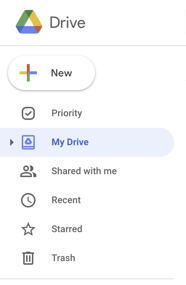
In Google Drive, there are several different type of documents that can be created. 3 common ones are: *Docs, Sheets, and Slides*.
### **FAQs**
#### **Why Does CounselMore work with Google Drive?**
Because Google Drive is:
1. Intuitive-easy for both the tech-literate and tech-challenged
2. Used by schools across the world that have implemented Google apps for Education
3. Used by almost every high school student!
#### **How Will I be Using Google Drive with the CounselMore App?**
You will use Google Drive to receive and share files with and from students.
You will store all documents for a student in your Drive.
Students will use your Google Drive without needing to send you links to documents.
#### **I want to receive help directly from Google. Where can I go?**
Google has an extensive Help Center that you can access by clicking [this](https://support.google.com/?hl=en) link.
#### **Will my students see all the files in my Google Drive?**
It’s important for you to know, **no one** will see your **entire** Google Drive. You will be granting permissions on a folder per student basis. It is impossible for someone to come across a file/folder and have access to it without being logged in to the proper account which you have given access to.
#### **Can I share the folder with the parents?**
Yes. In Google Drive, (not in Counsel**More,)** you will have functionality to share a given file/folder with parent(s)' Google Accounts. To do this, you will need to ask the parent(s) for their **Google Account Email Address**.
#### **Can I share something with a student and not with a parent? Vice Versa?**
Yes.
#### **Can I set different permissions for a student & parent?**
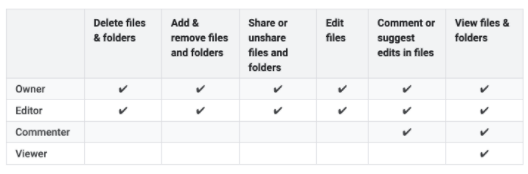
Yes. By Default, the student is given editing permissions to all files. See below for the different permission levels support by Google Drive:
#### **How Do I find documents that a student or parents has shared with me?**
When at the **root** of your Google Drive, Click "Shared with me" in the lefthand menu. This will bring up a list of documents that have been shared with you by other Google Accounts.
#### **How would I share a Google Drive File or Folder with a parent?**
1. Start at the **root** of your Google Drive
2. Navigate through the folders until you see the folder or file you're looking for
3. Right click it and click "share"
4. Paste the email of the person you're sharing with over "Add people and groups"
5. To the left ,you'll see "Editor" click on that if you want to change the permission level
6. (Optional) add a note that the person will see via email along w/ the share notification
7. Click "Send"
```
Note: Sharing files to students is done by default for you, for every corresponding file in their particular Files Tab (in the CounselMore app).
```
**Now that you have Google Drive fundamentals, watch this video which prefaces setting up your Google Drive Structure and connecting your drive to CounselMore.**
**Still have questions or need additional support?**
- Contact support@counselmore.com for further assistance.
- [ACCOUNT SET UP](https://helpdesk.counselmore.com/account-set-up?hsLang=en#main-content)
- [New Account - SELF GUIDED SET UP](https://helpdesk.counselmore.com/account-set-up?hsLang=en#new-account-self-guided-set-up)
- [New Account - FREE LIVE TRAINING](https://helpdesk.counselmore.com/account-set-up?hsLang=en#new-account-free-live-training)
- [New Account - MULTI LICENSE ACCOUNT SET UP](https://helpdesk.counselmore.com/account-set-up?hsLang=en#new-account-multi-license-account-set-up)
- [New Account - COLLEGE SEARCH NAVIGATION](https://helpdesk.counselmore.com/account-set-up?hsLang=en#new-account-college-search-navigation)
- [New Account - PARENT & STUDENT USERS](https://helpdesk.counselmore.com/account-set-up?hsLang=en#new-account-parent-student-users)
- [CLIENT MANAGEMENT](https://helpdesk.counselmore.com/client-management?hsLang=en#main-content)
- [Clients - Biographical Banners](https://helpdesk.counselmore.com/client-management?hsLang=en#clients-biographical-banners)
- [Clients - Assignments tab](https://helpdesk.counselmore.com/client-management?hsLang=en#clients-assignments-tab)
- [Clients - Files tab](https://helpdesk.counselmore.com/client-management?hsLang=en#clients-files-tab)
- [Clients - Messages tab](https://helpdesk.counselmore.com/client-management?hsLang=en#clients-messages-tab)
- [Clients - Accounting tab](https://helpdesk.counselmore.com/client-management?hsLang=en#clients-accounting-tab)
- [Clients - Quicklist](https://helpdesk.counselmore.com/client-management?hsLang=en#clients-quicklist)
- [Clients - Contacts](https://helpdesk.counselmore.com/client-management?hsLang=en#clients-contacts)
- [Clients - Fin Fit tab](https://helpdesk.counselmore.com/client-management?hsLang=en#clients-fin-fit-tab)
- [ADMISSIONS DATA & SEARCH NAVIGATION](https://helpdesk.counselmore.com/admissions-data-search-navigation?hsLang=en#main-content)
- [College Data](https://helpdesk.counselmore.com/admissions-data-search-navigation?hsLang=en#college-data)
- [College List - Columns](https://helpdesk.counselmore.com/admissions-data-search-navigation?hsLang=en#college-list-columns)
- [College Data - App Tracker](https://helpdesk.counselmore.com/admissions-data-search-navigation?hsLang=en#college-data-app-tracker)
- [GOOGLE-DRIVE](https://helpdesk.counselmore.com/google-drive?hsLang=en#main-content)
- [Google Drive Settings](https://helpdesk.counselmore.com/google-drive?hsLang=en#google-drive-settings)
- [Google Drive - Master Folders](https://helpdesk.counselmore.com/google-drive?hsLang=en#google-drive-master-folders)
- [Google Drive - Document Management](https://helpdesk.counselmore.com/google-drive?hsLang=en#google-drive-document-management)
- [SETTINGS MENU & CUSTOMIZATIONS](https://helpdesk.counselmore.com/settings-menu-customizations?hsLang=en#main-content)
- [Settings - My Business](https://helpdesk.counselmore.com/settings-menu-customizations?hsLang=en#settings-my-business)
- [Settings - Branding](https://helpdesk.counselmore.com/settings-menu-customizations?hsLang=en#settings-branding)
- [Settings - Default Data Columns](https://helpdesk.counselmore.com/settings-menu-customizations?hsLang=en#settings-default-data-columns)
- [Settings - Routine Assignments](https://helpdesk.counselmore.com/settings-menu-customizations?hsLang=en#settings-routine-assignments)
- [Settings - Webmaster](https://helpdesk.counselmore.com/settings-menu-customizations?hsLang=en#settings-webmaster)
- [Settings - Broadcast Station](https://helpdesk.counselmore.com/settings-menu-customizations?hsLang=en#settings-broadcast-station)
- [Settings - Reporting](https://helpdesk.counselmore.com/settings-menu-customizations?hsLang=en#settings-reporting)
- [Settings - Professional Log Books](https://helpdesk.counselmore.com/settings-menu-customizations?hsLang=en#settings-professional-log-books)
- [Settings - Toolbox](https://helpdesk.counselmore.com/settings-menu-customizations?hsLang=en#settings-toolbox)
- [Settings - Texting Set up](https://helpdesk.counselmore.com/settings-menu-customizations?hsLang=en#settings-texting-set-up)
- [Settings - Accounting Setup](https://helpdesk.counselmore.com/settings-menu-customizations?hsLang=en#settings-accounting-setup)
- [Settings - Integrations](https://helpdesk.counselmore.com/settings-menu-customizations?hsLang=en#settings-integrations)
- [SALES & DEMONSTRATIONS](https://helpdesk.counselmore.com/sales-demonstrations?hsLang=en#main-content)
- [Sales, Free Trials, Demonstrations](https://helpdesk.counselmore.com/sales-demonstrations?hsLang=en#sales-free-trials-demonstrations)
- [MEMBER BENEFITS](https://helpdesk.counselmore.com/member-benefits?hsLang=en#main-content)
- [Community Resources](https://helpdesk.counselmore.com/member-benefits?hsLang=en#community-resources)
- [Member Benefits](https://helpdesk.counselmore.com/member-benefits?hsLang=en#member-benefits)
- [Customer Service Support](https://helpdesk.counselmore.com/member-benefits?hsLang=en#customer-service-support)
- [Privacy Policies](https://helpdesk.counselmore.com/member-benefits?hsLang=en#privacy-policies)
- [Sales Lead Tools](https://helpdesk.counselmore.com/sales-lead-tools?hsLang=en#main-content)
- [Directory](https://helpdesk.counselmore.com/sales-lead-tools?hsLang=en#directory)
[](http://counselmore.com)
Please note that CounselMore is a robust college planning platform with multiple integrations.
Copyright © 2025, CounselMore