---
title: "#3a New Accounts Training : Mobile Apps for Counselors & Students - Take College Tours Notes directly into College List Notes and Student Research Notes"
description: Our mobile app brings your college tours into hand.
---
[Skip to content](https://helpdesk.counselmore.com/college-tours-by-counselmore-mobile-app#main-content)
English
Show submenu for translations
[](https://helpdesk.counselmore.com/?hsLang=en)
Open main navigation
Close main navigation
- English
Show submenu for translations
Select below, or search by topic
- There are no suggestions because the search field is empty.
1. [Knowledge Base : CounselMore Support](https://helpdesk.counselmore.com/?hsLang=en)
2. [MEMBER BENEFITS](https://helpdesk.counselmore.com/member-benefits?hsLang=en)
3. [Member Benefits](https://helpdesk.counselmore.com/member-benefits?hsLang=en#member-benefits)
# #3a New Accounts Training : Mobile Apps for Counselors & Students - Take College Tours Notes directly into College List Notes and Student Research Notes
## Our mobile app brings your college tours notes and data to one place
### Begin with DESK TOP first. After the desk top account is created, the mobile app will be active.
Where to download:
**IOS app:**
[https://apps.apple.com/us/app/counselmore/id6748926364](https://apps.apple.com/us/app/counselmore/id6748926364)
**Android:**
[https://play.google.com/store/apps/details?id=com.counselmore.cmandroidapp&utm\_source=na\_Med](https://play.google.com/store/apps/details?id=com.counselmore.cmandroidapp&utm_source=na_Med)
---
How to Add the [Student Research Notes to College List](https://helpdesk.counselmore.com/how-to-add-student-research-notes-to-college-list?hsLang=en)
**Login with your CounselMore login.**

After logging in with your **CounselMore counselor credentials**, you will see three main tabs in the mobile app:
- **Home**
- **Colleges**
- **Messages**
These tabs allow you to quickly view notifications, reference colleges, and communicate with students and families.
---
### **Home Tab (Notifications)**
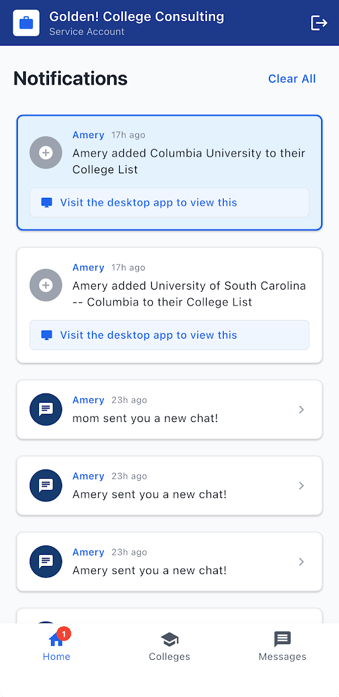The **Home tab** displays notifications and updates related to your students and activity in CounselMore.
Examples of notifications include:
- When a student **adds a college to their list**
- When a student or parent **sends a new chat message**
- Other activity updates related to your account
Some notifications may include a message such as:
**“Visit the desktop app to view this.”**
This means the full details or action must be completed in the **CounselMore web portal**.
---
### **Colleges Tab**
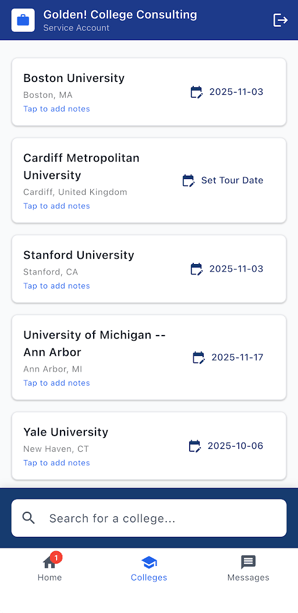
You'll see the College Tours list you entered in your CounselMore \> Settings \> Counselor Profile \> College Tours. (**see web portal view below**)
***Web Portal View****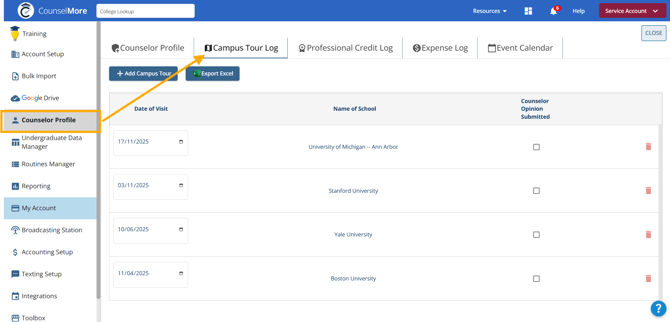***
From this tab you can:
- Reference college details while traveling or during campus visits
- **Add notes about a college visit or campus tour**
- **Add or update college tour dates**
This feature makes it easy to **capture tour information in real time while visiting campuses**. Notes and tour dates entered in the mobile app will automatically **sync with your CounselMore web portal**.
**Tip:** Use the Colleges tab during or immediately after a campus visit to record impressions, important details, and tour dates while the information is fresh.
---
#### **Counselor log College Tour notes on the go!**
You can add schools, tour dates and college notes **(Use your mic to take notes!)** from the mobile app.
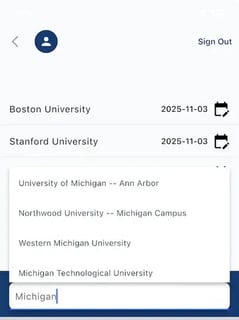 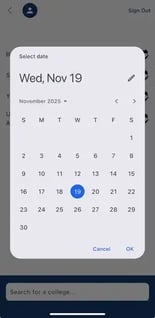 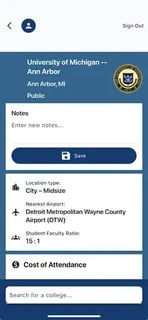
ℹ️ Simply click on the school to see school details and add/dictate your notes.
---
### Messages Tab
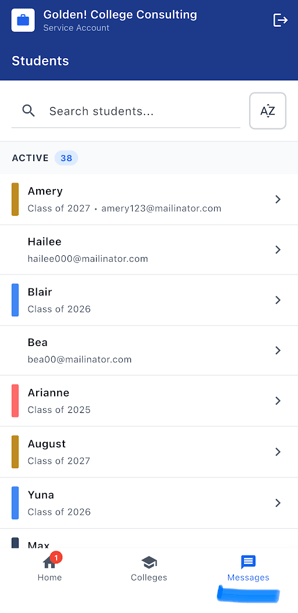
The **Messages tab** allows counselors to communicate with students and parents directly from the mobile app.
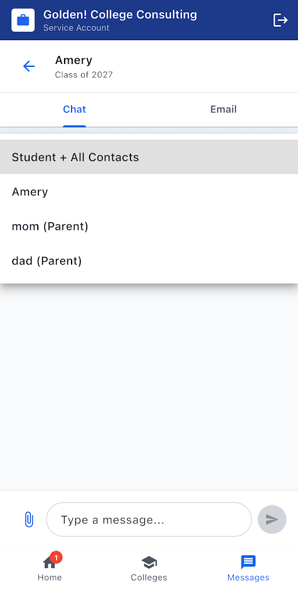
Within the Messages tab, there are **two sub-tabs**: **Emails** and **Chats**.
---
### Emails
The **Emails** section allows counselors to **view and send emails** through CounselMore Mobile App.
Counselors can:
- **Send emails to students and parents**
- View email conversations and message history
- Stay updated on communications sent through the CounselMore messaging system
Emails sent or received in the mobile app automatically **sync with the Messaging tab in the CounselMore web portal**.
---
### Chats
The **Chats** section allows counselors to communicate with students and parents through real-time messaging.
Counselors can:
- View and read chat conversations
- **Send and receive chat messages in real time**
- Participate in **one-to-one chats with students or parents**
- Receive notifications when new messages are sent
Chat messages automatically sync with the **CounselMore web portal**, so conversations remain consistent across mobile and desktop.
---
### Group Chat (When Parents Are Invited)
If **parents are invited to the student portal**, the **Group Chat feature** becomes available.
Group chat allows **Counselors, Students and Parents** to participate in the **same conversation thread**.
Participants can **exchange messages in real time**, making it easier for everyone involved in the student's counseling process to stay informed.
---
### **FOR STUDENTS:**
#### CounselMore Student App is giving students instant mobile access to their college-planning portal. With the new app, add to Student Research Notes while on a campus tour!
**New to the mobile app?**
Learn how students and parents access CounselMore on mobile and web:
👉 [**CounselMore Mobile Access for Students and Parents**](https://helpdesk.counselmore.com/for-parents-students-counselmore-mobile-app?hsLang=en)
- [ACCOUNT SET UP](https://helpdesk.counselmore.com/account-set-up?hsLang=en#main-content)
- [New Account - SELF GUIDED SET UP](https://helpdesk.counselmore.com/account-set-up?hsLang=en#new-account-self-guided-set-up)
- [New Account - FREE LIVE TRAINING](https://helpdesk.counselmore.com/account-set-up?hsLang=en#new-account-free-live-training)
- [New Account - MULTI LICENSE ACCOUNT SET UP](https://helpdesk.counselmore.com/account-set-up?hsLang=en#new-account-multi-license-account-set-up)
- [New Account - COLLEGE SEARCH NAVIGATION](https://helpdesk.counselmore.com/account-set-up?hsLang=en#new-account-college-search-navigation)
- [New Account - PARENT & STUDENT USERS](https://helpdesk.counselmore.com/account-set-up?hsLang=en#new-account-parent-student-users)
- [CLIENT MANAGEMENT](https://helpdesk.counselmore.com/client-management?hsLang=en#main-content)
- [Clients - Biographical Banners](https://helpdesk.counselmore.com/client-management?hsLang=en#clients-biographical-banners)
- [Clients - Assignments tab](https://helpdesk.counselmore.com/client-management?hsLang=en#clients-assignments-tab)
- [Clients - Files tab](https://helpdesk.counselmore.com/client-management?hsLang=en#clients-files-tab)
- [Clients - Messages tab](https://helpdesk.counselmore.com/client-management?hsLang=en#clients-messages-tab)
- [Clients - Accounting tab](https://helpdesk.counselmore.com/client-management?hsLang=en#clients-accounting-tab)
- [Clients - Quicklist](https://helpdesk.counselmore.com/client-management?hsLang=en#clients-quicklist)
- [Clients - Contacts](https://helpdesk.counselmore.com/client-management?hsLang=en#clients-contacts)
- [Clients - Fin Fit tab](https://helpdesk.counselmore.com/client-management?hsLang=en#clients-fin-fit-tab)
- [ADMISSIONS DATA & SEARCH NAVIGATION](https://helpdesk.counselmore.com/admissions-data-search-navigation?hsLang=en#main-content)
- [College Data](https://helpdesk.counselmore.com/admissions-data-search-navigation?hsLang=en#college-data)
- [College List - Columns](https://helpdesk.counselmore.com/admissions-data-search-navigation?hsLang=en#college-list-columns)
- [College Data - App Tracker](https://helpdesk.counselmore.com/admissions-data-search-navigation?hsLang=en#college-data-app-tracker)
- [GOOGLE-DRIVE](https://helpdesk.counselmore.com/google-drive?hsLang=en#main-content)
- [Google Drive Settings](https://helpdesk.counselmore.com/google-drive?hsLang=en#google-drive-settings)
- [Google Drive - Master Folders](https://helpdesk.counselmore.com/google-drive?hsLang=en#google-drive-master-folders)
- [Google Drive - Document Management](https://helpdesk.counselmore.com/google-drive?hsLang=en#google-drive-document-management)
- [SETTINGS MENU & CUSTOMIZATIONS](https://helpdesk.counselmore.com/settings-menu-customizations?hsLang=en#main-content)
- [Settings - My Business](https://helpdesk.counselmore.com/settings-menu-customizations?hsLang=en#settings-my-business)
- [Settings - Branding](https://helpdesk.counselmore.com/settings-menu-customizations?hsLang=en#settings-branding)
- [Settings - Default Data Columns](https://helpdesk.counselmore.com/settings-menu-customizations?hsLang=en#settings-default-data-columns)
- [Settings - Routine Assignments](https://helpdesk.counselmore.com/settings-menu-customizations?hsLang=en#settings-routine-assignments)
- [Settings - Webmaster](https://helpdesk.counselmore.com/settings-menu-customizations?hsLang=en#settings-webmaster)
- [Settings - Broadcast Station](https://helpdesk.counselmore.com/settings-menu-customizations?hsLang=en#settings-broadcast-station)
- [Settings - Reporting](https://helpdesk.counselmore.com/settings-menu-customizations?hsLang=en#settings-reporting)
- [Settings - Professional Log Books](https://helpdesk.counselmore.com/settings-menu-customizations?hsLang=en#settings-professional-log-books)
- [Settings - Toolbox](https://helpdesk.counselmore.com/settings-menu-customizations?hsLang=en#settings-toolbox)
- [Settings - Texting Set up](https://helpdesk.counselmore.com/settings-menu-customizations?hsLang=en#settings-texting-set-up)
- [Settings - Accounting Setup](https://helpdesk.counselmore.com/settings-menu-customizations?hsLang=en#settings-accounting-setup)
- [Settings - Integrations](https://helpdesk.counselmore.com/settings-menu-customizations?hsLang=en#settings-integrations)
- [SALES & DEMONSTRATIONS](https://helpdesk.counselmore.com/sales-demonstrations?hsLang=en#main-content)
- [Sales, Free Trials, Demonstrations](https://helpdesk.counselmore.com/sales-demonstrations?hsLang=en#sales-free-trials-demonstrations)
- [MEMBER BENEFITS](https://helpdesk.counselmore.com/member-benefits?hsLang=en#main-content)
- [Community Resources](https://helpdesk.counselmore.com/member-benefits?hsLang=en#community-resources)
- [Member Benefits](https://helpdesk.counselmore.com/member-benefits?hsLang=en#member-benefits)
- [Customer Service Support](https://helpdesk.counselmore.com/member-benefits?hsLang=en#customer-service-support)
- [Privacy Policies](https://helpdesk.counselmore.com/member-benefits?hsLang=en#privacy-policies)
- [Sales Lead Tools](https://helpdesk.counselmore.com/sales-lead-tools?hsLang=en#main-content)
- [Directory](https://helpdesk.counselmore.com/sales-lead-tools?hsLang=en#directory)
[](http://counselmore.com)
Please note that CounselMore is a robust college planning platform with multiple integrations.
Copyright © 2025, CounselMore