
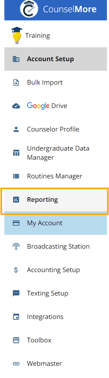
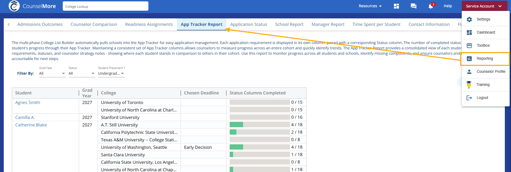
There are two ways to access this report — from your Settings or through Reporting.
How colleges move into App Tracker
Colleges move through three sequential tabs on a student's record:
- Counselor List — where the counselor first adds a college under consideration. Private to the counselor; not visible to the student/family.
- Student List — the college has been promoted so the student (and family, via the Student Portal) can see it.
- App Tracker — the college has been promoted again into active application tracking.
The Application Tracker Report
Go to Service Account (top right) → Reporting → App Tracker Report.
Once the App Tracker Report opens, you can customize your view with filters and sorting tools:
1. Filter Results
- Filter by Graduation Year, Student Status, or Student Placement to narrow down your list.
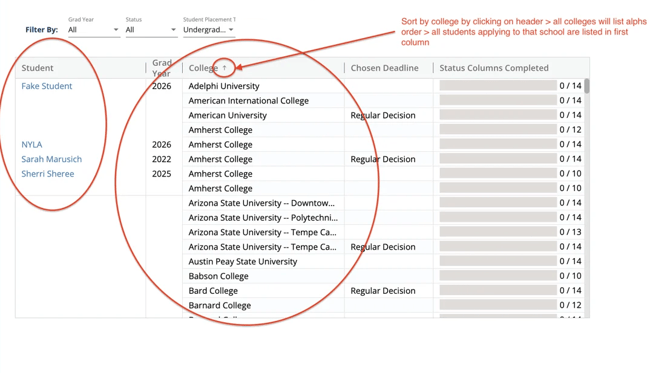
2. Sort by College
- Click the College Name header.
- You’ll see a list of all colleges in alphabetical order.
The Application Tracker Report correlates directly with the number of Status Columns within each student's Application Tracker. As each status column is marked as complete, the progress bar within their report increments by one. This feature offers a comprehensive overview of the entire application process for all your students at a glance. Read more about Status Columns here!
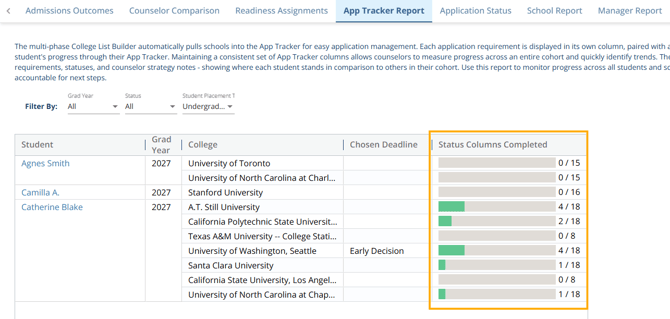
Note: This report only includes colleges once they've reached the App Tracker stage. If a college is still on a student's Counselor List or Student List (not yet promoted to App Tracker), it won't appear here — there's currently no cross-student search or reporting for that.