
Canceling Your CounselMore Account
All cancellations require 30 days’ written notice submitted through our official cancellation form.
Why 30 days?
The 30-day window allows CounselMore to:
-
Verify the account owner
-
Complete secure data handling and prepare for deletion
-
Apply one fair, consistent process across all accounts
-
Manage customer service volume without raising prices
-
Ensure no premature or mistaken access revocations
This is standard SaaS practice and ensures your data and subscription are handled securely and equitably.
How to Cancel
-
Complete the official cancellation form.
-
The date CounselMore receives your completed form becomes your official notice date.
-
Billing continues for the 30-day notice period.
-
When the notice period ends, your account will close and your data will be deleted.
Important
-
CounselMore cannot interrupt charges scheduled within the next 30 days if notice has not been provided.
-
We do not provide refunds for mid-cycle cancellations.
-
Once deleted, data cannot be recovered.
-
If a customer wishes to return after their data has been permanently deleted, we will make every effort to help rebuild the account with their participation. Because deletion is irreversible, we cannot guarantee full restoration, but we will guide the customer through re-establishing their workspace wherever possible.
💝 🛌 ⛵ Pausing Your Account (Up to 3 Months)
If your practice is slowing down or you’re stepping away temporarily, you may request a one-time 3-month account pause. CounselMore supports the independent practitioner.
During a pause:
-
✔ Billing is stopped for up to 3 months
-
✔ Your data and account history remain protected
-
❌ You cannot access your account during the pause
Eligibility
Your account must be in good standing (i.e., no unpaid balance) at the time the pause request is submitted.
Returning Early From a Pause
If you want to return before the 3-month pause ends:
-
Log in to your account.
-
You will see a paywall.
-
Pay the current monthly fee (no penalties, no back-pay).
-
Your full account access is restored immediately.
-
Regular billing resumes monthly.
After 3 Months
Billing will automatically resume using the card on file, and your login credentials will remain the same.
Summary Table
| Request Type | Requirements | Billing Impact | Account Access | Data Handling |
|---|---|---|---|---|
| Cancel | 30-day written notice | Bills through the 30-day notice period | Ends after notice period | Permanently deleted |
| Pause | Account in good standing; 1 pause allowed | Billing stops for up to 3 months | No access during pause | Fully protected |
| Return Early | Pay current month’s fee | Billing restarts immediately | Access immediately restored | No data loss |
30 FREE TRIAL ACCOUNT
What if I was unaware that my account would charge after the trial ended...?
CounselMore isn't free because we've made a deliberate choice not to be. Many "free" platforms in this space cover their costs by collecting and selling student data to advertisers and third parties. We don't do that, and we never have. Since 2016, CounselMore has never sold, shared, or rented student information; families own their student data, and counselors own their own content and curriculum. There are no ads and no third-party monetization on our platform.
Maintaining that standard — while still delivering current, reliable data and strong privacy protections — costs more than the data-broker model, because we're not offsetting our costs the way many competitors do. Your subscription is what makes that possible.
If you'd like to talk through your specific plan, usage, or options, we're glad to help — just let us know. Below is an outline of how we have tried to be transparent about the free trial. Thank you for creating an account - we appreciate it and are here to assist you as colleagues and service providers. Please reach out anytime!
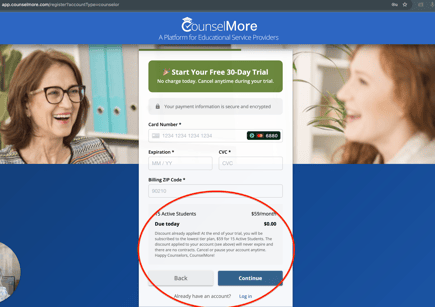
one more time before we begin
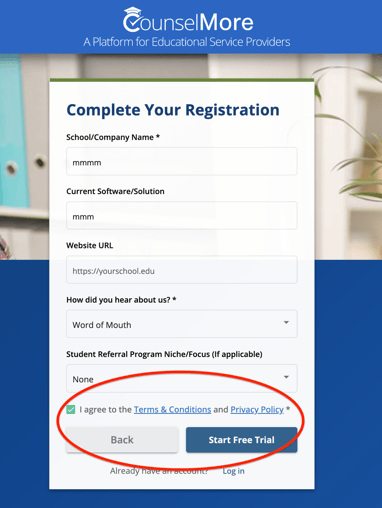
We capitalize it so it is not in fine print.
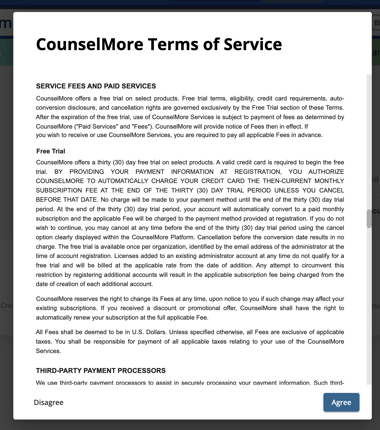
During your free 30 day trial a bright Pink countdown is shown on your screen at all times.

Lower on the page, under My Account, you'll find a Close Trial Button.
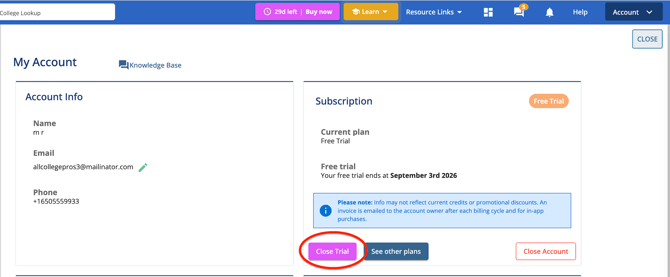
Click and close trial - and your free trial will end.
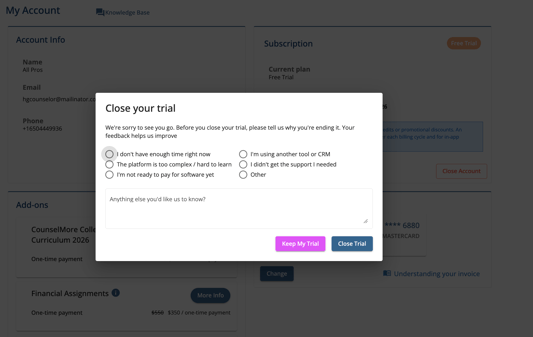
After the trial ends, charges begin. If you change your mind and would like to cancel your paid account - you will click the close Account button. These options remain in the same place so they are easy for you to locate again later.
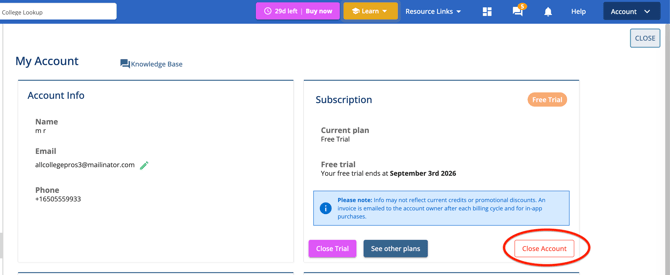
We thank you for your trying out CounselMore - we hope you will come back soon! If you need assistance with onboarding or setting up your account - email us support@counselmore.com
How do I cancel my account?
Write to support@counselmore.com, submit cancelation form .
If you've decided to cancel your subscription to CounselMore due to unexpected circumstances, we want to express our understanding and support for your situation. While we are saddened by your decision, please know that we are here to help you on your counseling journey. If you ever decide to come back in the future, we will be thrilled to welcome you with open arms.
Our team is fully dedicated to providing you with the necessary tools and resources for success, and we are committed to assisting you every step of the way.
To cancel plan or your account:
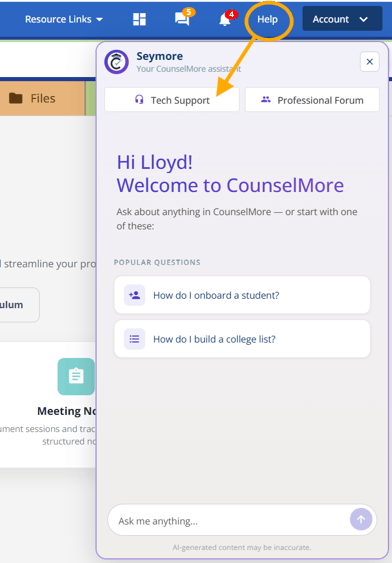
1. Go to CounselMore Helpdesk by clicking the Help and Tech Support.
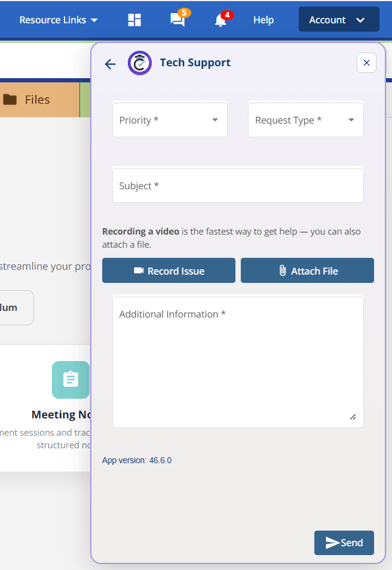
2. Provide the required information and click on the send button.
Tip:
Alternatively, you have the option to cancel plan or account by sending an email to support@counselmore.com.
You will receive a Cancellation Form
Submit the form
The Form Submission Date - will be your date of cancellation
- We cannot cancel your account without your cancelation form submission.
- Your account charges will stop at the end of your current billing cycle, per the date of your submission.
Cancellation by User - You can cancel your CounselMore Account anytime by submitting a cancellation form, which may be obtained by writing to support@counselmore.com. Upon verifying the cancellation request is being made by the account holder, CounselMore will cancel the subscription and close billing at the end of the current billing cycle, per the date of the cancellation form submission. However, please be advised that CounselMore will not provide refunds for accounts canceled in the middle of a Monthly Term or Annual Term or for months in which you maintained a subscription, but did not utilize the paid services. These policies are universal to all account holders.